


Before you write a single word, or upload any audio, video, or image files, you’ll need to get very clear about a few things:
- The intended action you want your website visitors to take
- The type of content that will work best to guide your visitors to take that action
- The best format to deliver that content
That’s why you’ll want to work with a Landing Page Content Template (handout) to organize your thoughts.
The first decision you’ll make is the type of content you’re going to post.
The next decision will be to choose the best format for delivering that content type.
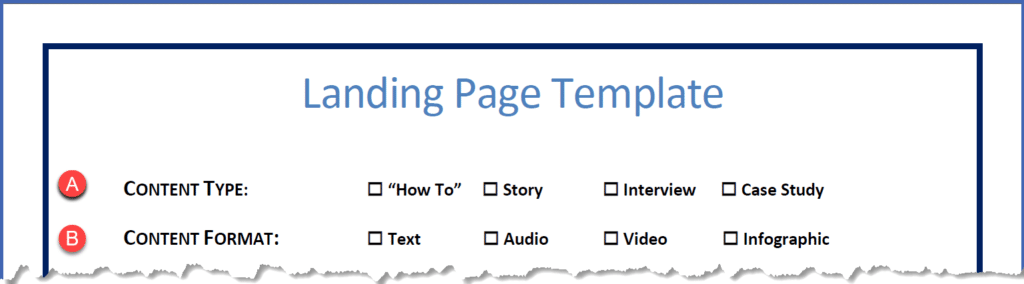
Let’s take these decisions one at a time.
A. Content Type
While there are dozens of ways to deliver information, let me share four basic types of quick and easy content that you can put together.
- “How To”
You know how to do lots of things other people don’t.
Whatever you know how to do, you can write about, create a podcast or video about, or make an infographic or slideshow about.
The products you’ve invested in, the books or articles you’ve read, probably every webinar you’ve attended… all of them contain chunks of valuable content that you can share.
Whenever you learn something new from a book, a course, an interview, a live event, or even a basic web search, figure out how you would teach it to someone.
All you need is to take something you’ve learned how to do, break it down into a step-by-step formula or process, and then support each step with facts, figures, and illustrations.
“How To” content is one of the best ways to position yourself as an authority.
- Story
Since the dawn of human history, people have gathered around campfires and shared stories.
It’s how we humans passed down history, shared ideas, and taught values to our tribes.
If you think about it, stories are still one of the primary ways we teach our children about what’s important in the world.
Stories are so powerful because they speak to and stir up our emotions and engage our imaginations.
People don’t often remember the specific lessons within some boring lecture.
But tell a story to illustrate those same lessons, and you’ll have a much better chance of engaging, connecting, and creating relationship with your audience, while delivering a message they’ll remember.
You can find stories all around you. You can use stories from your own experience, or from books, movies, magazine articles, television programs, sports – virtually from anything you’ve experienced and want to share.
- Interview
Interviews are really easy to use as a source of content. After all, it’s simple to fire up a Google Hangout or meet up on Skype, record it, and turn it into a post.
Another great benefit of using interviews to create content is that they almost always spur you to dive deeper into the additional subjects that will naturally rise up from the original interview.
That means that one interview can reward you with several ideas for additional content.
Who should you interview? Start with your upline, people who are successful at what they’re doing. When you meet experts at live events, see if you can connect to invite them to participate in an interview.
- Case Study
A case study is a great way to demonstrate results or share valuable truths with people.
It also helps you address skepticism in advance by sharing specific results from someone else. You’re using third-party credibility to address the issue.
What’s easy about using a case study is that you’re not creating all the content yourself – you’re merely sharing someone else’s experience.
You can develop case studies from interviewing other people – users of your product or method, for example — and extracting value from them.
B. Content Formats
The next decision you’ll make is how to format the content for your landing page. There are currently just four types of content format that work really well online.
- Text
Writing a blog post or article might be the easiest way to “do” content, but if the idea of sitting down and writing a 500 – 2000 word post about a topic totally freaks you out, don’t worry. You’re not alone.
The truth is that nobody, really, is a great writer when they first start out.
Like any worthwhile skill, writing takes regular practice – especially if you’re not skilled at writing in an engaging, conversational tone.
But if you make writing a daily part of your life, you’ll get better at it.
The best way to write for the web is to imagine you’re having a one-on-one conversation with just ONE PERSON – your perfect prospect – and…
…Write like you talk.
When you’ve finished your article, read it out loud, as if you’re having a conversation with that one person.
Your article or post can be anything from 100 to 2000 words – just as long as it keeps your reader engaged and delivers your content in a simple, readable way.
- Audio
Another great way to create “consumable” content for your visitors and subscribers is to record and upload an audio file, or host a podcast.
Podcasts are a fantastic way to get exposure and gain a following. Not only that, archived podcasts represent a huge “value added” to your blog.
Some of the best audios and podcasts are for interview content, but there are also many other ways to use audio to present your content.
Do a little research to find podcasts on topics you’re interested in to help generate some ideas.
- Video
Video is an incredibly fast and easy way to create content.
Not only is it fast and easy, video is powerful. It helps you engage your visitors in a multi-sensory way that will help them engage with and retain more value from your content.
Online video is so popular, and so effective, you’d be crazy not to include it in your content strategy – no matter what business you’re in.
Now, if talking on camera isn’t your thing, don’t worry. You can create compelling videos that don’t require you to be in front of the camera.
You can use screen capture software like ScreenFlow or Camtasia with a Keynote or PowerPoint presentation on your computer to deliver “How To” content or illustrate stories or case studies.
You might also use a simple tool like WebinarJam to set up a webinar and host it in a Google Hangout On Air. You just show up and deliver a presentation, and the software will automatically record your presentation and host it on YouTube.
It might be intimidating at first, but you can also just use your computer, tablet, or smart phone to create your own “talking head video.” This might require a little more practice, but it’s much more engaging because you’re physically appearing on camera.
With a little practice anyone can learn how to create these types of videos pretty effortlessly. It’s well worth the effort.
- Infographic
People are attracted to imagery. When you combine imagery with valuable content, it has the potential to generate lots of likes and shares on social media, especially those social media platforms that are image focused.
A recent study stated that blogs using infographics get an average of 15% more traffic than those that don’t.
If you’re more of a creative type who’d rather share informative content in an aesthetically pleasing way, infographics might be the way to go.
There are many tools available to help you create amazing looking graphics quickly and easily.
Now that you’ve chosen your Content Type, and Content Format, it’s time to start creating it!