

It’s important for your brand to reflect how awesome you are, and a complete profile shows you are professional, committed, and serious about engaging with your visitors.
Your profile (whether it’s for your Personal Page or a Business/Fan Page) has two parts – images and text.
First, let’s talk about images.
If you already have a presence on other social networks, make sure your profile photo is consistent across all of your networks to show the consistency of your brand.
Use these dimensions for your Profile and Cover Photos:
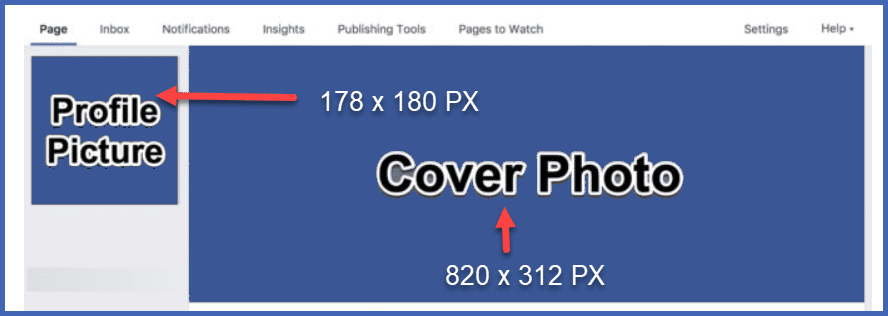
Facebook recommends uploading a photo that is 340px by 340px to create a sharper image when compressed for your profile picture.
For your cover photo, upload a picture that is 1640px wide by 624px high to maximize the image quality.
Now, let’s talk about the text you put in your profile.
Be sure to customize your bio/info section. To create the most accessible and professional social media bio, pay attention to these guidelines:
- Use keywords your audience might be looking for
- Tell people more about what you’ve done than who you are.
- Use simple, descriptive words, not jargon or industry slang
- Address the “what’s in it for me” your followers come to your page wanting to know
- Be personal and friendly
- Update as you need to, to keep your information current and fresh.
Now that you’ve chosen your social media platform and completed your profile, it’s time to start creating content to share!