

It might help to think of scheduling and promoting your Facebook Live like you were planning a party.
You need to set a day and time, you need to send out invitations, and you need to create some excitement, curiosity, and anticipation.
That boils down to scheduling and promotion.
Schedule Your Facebook Live
You could drive yourself crazy trying to figure out the analytics of the optimum time and day of the week to schedule your event.
Don’t worry too much about it. At least not for your first one.
Just make sure that you’re scheduling it for a time when the majority of your audience is likely to be awake and online. Midnight Pacific Time won’t cut it.
In general, if you’re planning on doing your Live on a weekday during business hours, between 1 and 3 pm seems to be a good time. People are either eating lunch, or taking a pause before winding back up into work mode.
After work, between 6 pm and 9 pm works a little better. People are done with their commute (for the most part), most have finished dinner, and they’re probably unwinding from the “busyness” of their day.
But before you schedule your Live, check for holidays, special events, or anything important (think major league ball games, the Olympics, or other programs) that would compete with you for attention.
Once you schedule your Facebook Live as an event, it will post automatically to your Page’s News Feed.
Promote Your Facebook Live
Start promoting your Facebook Live in advance. Use any of your other social media accounts, your blog, or your website, your email list, as well as your Facebook News Feed, to invite people to show up.
Post a status announcing your Facebook Live. Create a compelling “headline” to attract viewers from among your followers — a compelling reason to tune in. For example:
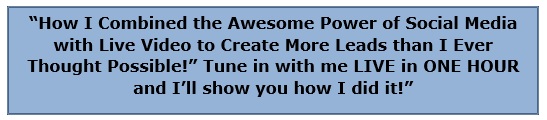
It’s a good idea to set up a “promotion plan” for yourself, to start generating buzz about your upcoming Facebook Live.
You can always pay to advertise your Facebook Live, but it’s easy to get visitors from your existing fan base.
Let’s say, for example, want to do your Facebook Live on Monday night at 7:00 p.m. Central Time. Your promotion schedule might look like this:
| Friday: | Schedule the Facebook Live as an Event. Facebook will automatically post to your News Feed that your Facebook Live is scheduled for Monday, 7 pm Central. Anybody who has liked your page will see the notification. |
| Saturday: | Repeat the notification on your Timeline (repost or share it) |
| Sunday: | Repeat the notification on your Timeline again. Share the link to your Facebook Live on your personal profile, your website, your blog, your email list, and your other social media pages. |
| Monday: | Share the link again on your personal profile and your other social media pages. Share the link on your personal profiles just as the show goes live. |
So now that you’ve written and rehearsed your script, set a day and time for the Facebook Live, and started your promotion, it’s time for that “dry run.”