

Facebook makes it really easy to invite your contacts to your new page.
Right under your cover image, you’ll see a menu, with a three-dot “more” link:
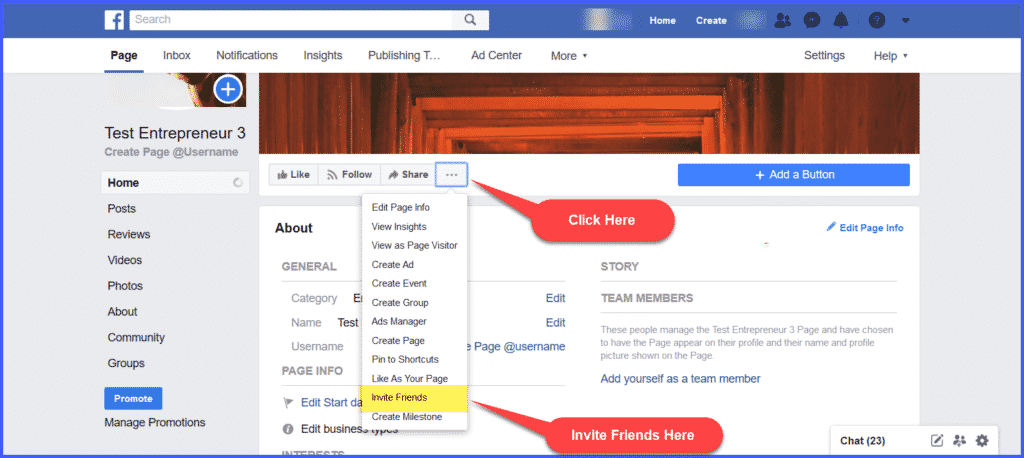
Click that three-dot link, and a dropdown menu will appear.
Select Invite Friends.
Now before you just run through your entire friends list, you’ll want to think about an “invitation strategy.”
- First, start with the people you know will support you no matter what…the people who already know, like, and trust you. Just click “invite” and Facebook will automatically send them a message inviting them to your page.
Be selective about the friends you’d like to invite, and drill down to specifics –filtered by location, school, lists, groups, or recent interactions.
- Next, invite your colleagues, co-workers, or others in your industry. They’re more likely to be a source of social media promotion. Ask the people who work with you to visit and like the page, and, if they’re willing, recommend your page to any of their friends who might be interested.
- Promote your Page, and link to it from your website (if you have one). It’s a great, passive way to attract visitors to your Facebook Page, because they can just click the Facebook button and get right to it.
- Add your Facebook Page URL to your email signature, right there under your phone number or other contact information.
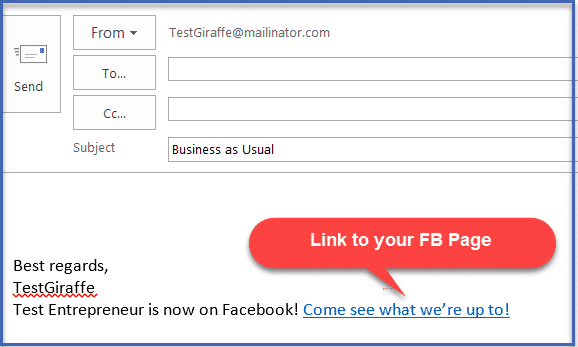
- Let all of your contacts in your other social media accounts know you’re up and running on Facebook, by posting a link to your page (using your custom URL.)